Daily Overview reads a calendar feed link (an “iCal” / .ics URL) from your school’s system. Find yours below, copy it once, and paste it into Daily Overview. Jump to your platform:
The golden rule: you’re hunting for a link that ends in .ics (or starts with webcal://). If you can “subscribe” to your calendar in Apple or Google Calendar, that same link works in Daily Overview. Paste a webcal:// link as-is — we convert it automatically.
Canvas
Instructure Canvas — used by tons of schools & colleges
Canvas › Calendar
September 2025 · Month view
Your courses & assignments appear here
Calendar Feed1
2 ⟶
https://yourschool.instructure.com/feeds/calendars/user_xxx.icsCopy- On a computer, open Canvas and click Calendar in the left menu.
- Scroll to the bottom of the right-hand sidebar and click Calendar Feed ①.
- A box pops up with a link ending in .ics ② — copy the whole thing.
- Paste it into Daily Overview as your school calendar.
On mobile? The Calendar Feed link only shows on the web version, not the Canvas app — open Canvas in a phone or laptop browser to grab it.
PowerSchool
The student/parent portal many K-12 schools use
Navigation › My Calendars
Grades and Attendance
Grade History
My Calendars1
⬇ Subscribe — Class Assignments Only2
3 ⟶
webcal://powerschool.yourschool.org/guardian/ical_....icsCopy link- Log in to the PowerSchool parent/student portal in a web browser.
- In the left navigation, click My Calendars ① (near the bottom).
- Find Class Assignments and click its Subscribe button ②.
- Instead of opening it, right-click → Copy Link on the subscribe button ③ to get the
webcal://address. - Paste that link into Daily Overview.
Some districts hide My Calendars. If you don’t see it, your school may have turned off calendar feeds — ask a teacher or the front office whether an iCal/.ics subscription is available.
Blackbaud
Also called onCampus, Whipplehill, or “myschoolapp” — if your portal address contains
myschoolapp.com, this is you- Sign in to your school portal on a computer. Click Calendar in the row of tabs along the top.

- On the calendar, look at the small row of icons at the top right. Click the one that looks like a wifi signal on its side — that’s the feed button.
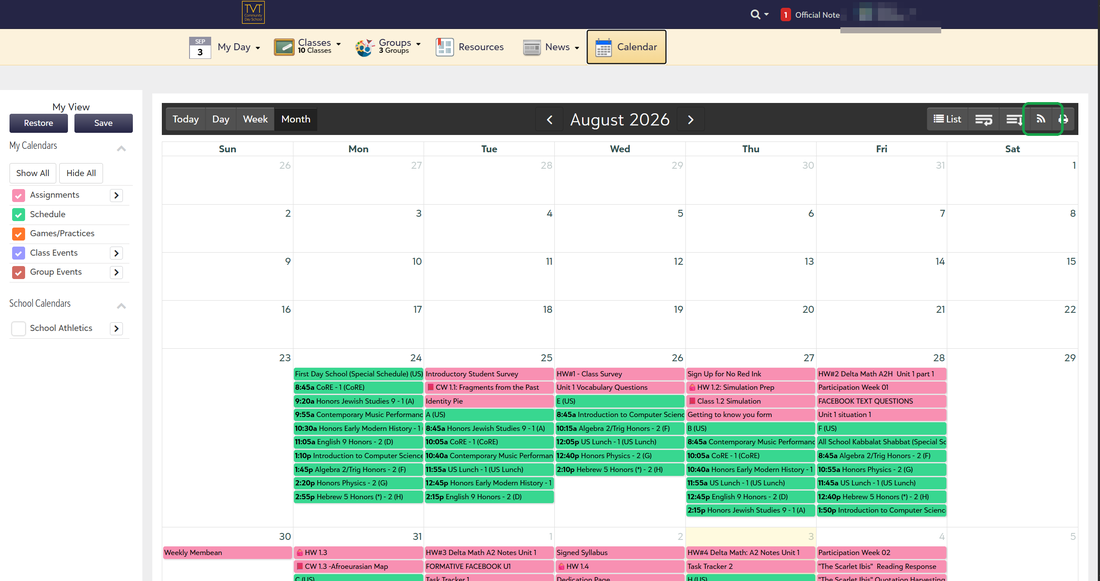
- A box called WebCal Feed for External Calendar opens. It offers two links: My Calendars and School Calendars. You want School Calendars — that’s the one with your assignments on it.
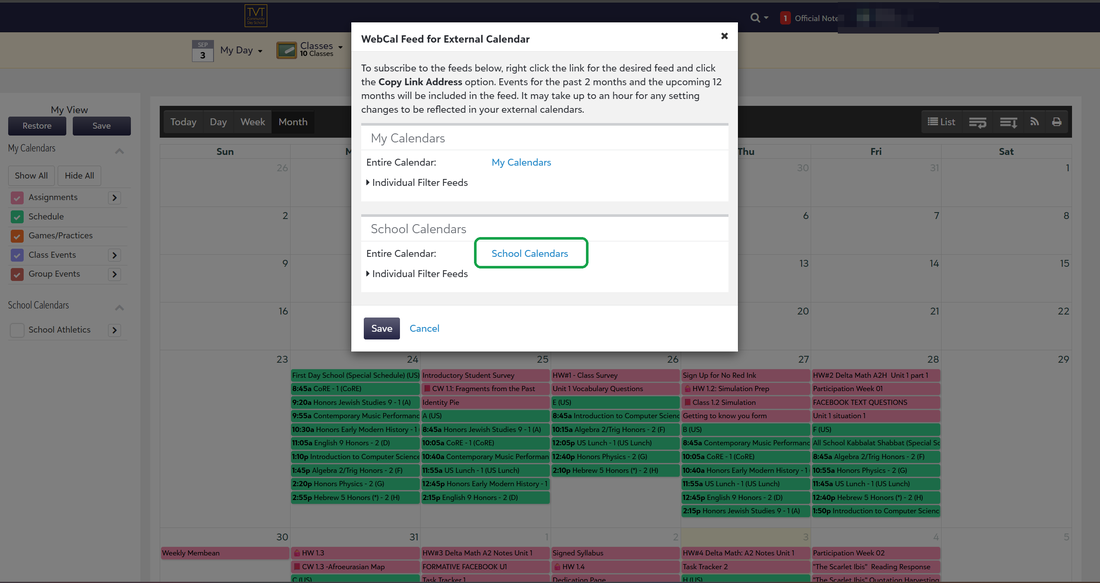
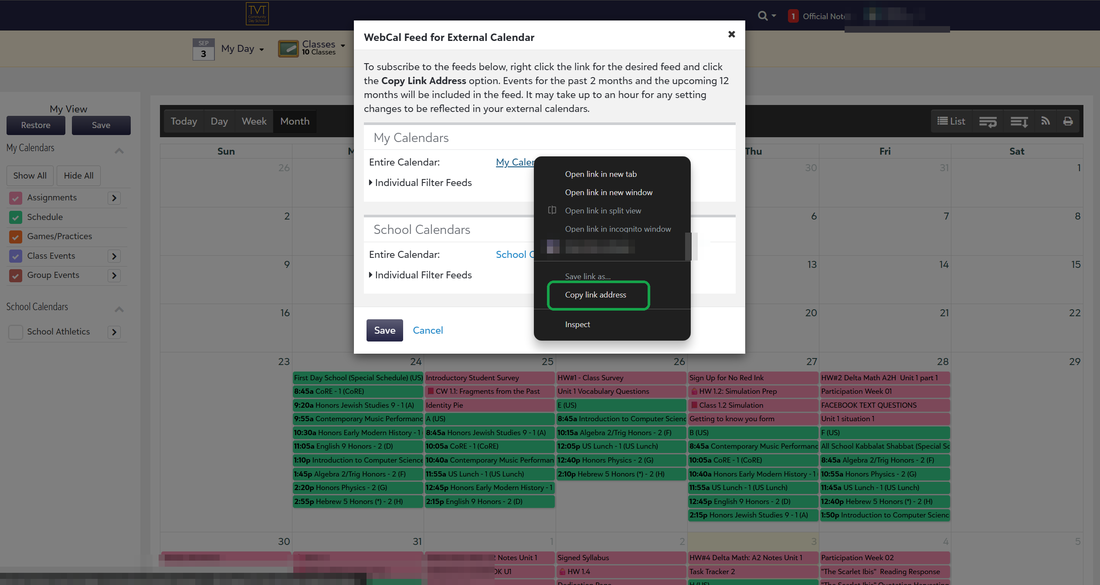
- Don’t click the link. Right-click it and choose Copy link address. Clicking it opens your calendar app instead of giving you the link.
- Come back here and paste it into Daily Overview, in Settings → Calendar. It starts with
webcal://— that’s right, paste it exactly as it is.
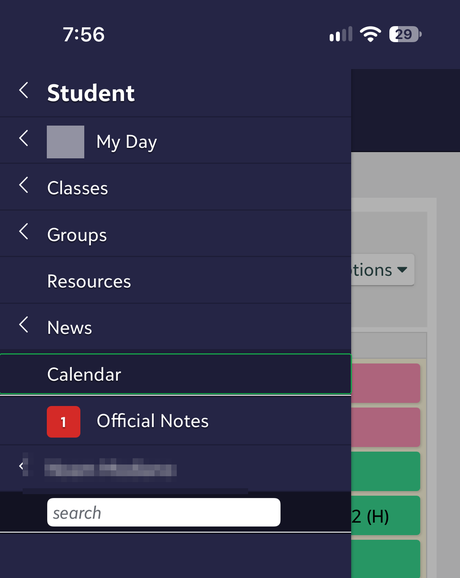
- Sign in to your school portal and tap the menu in the top-left.
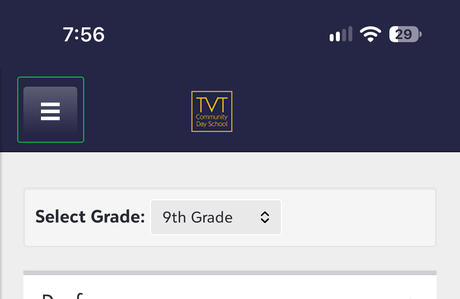
- Tap Calendar.
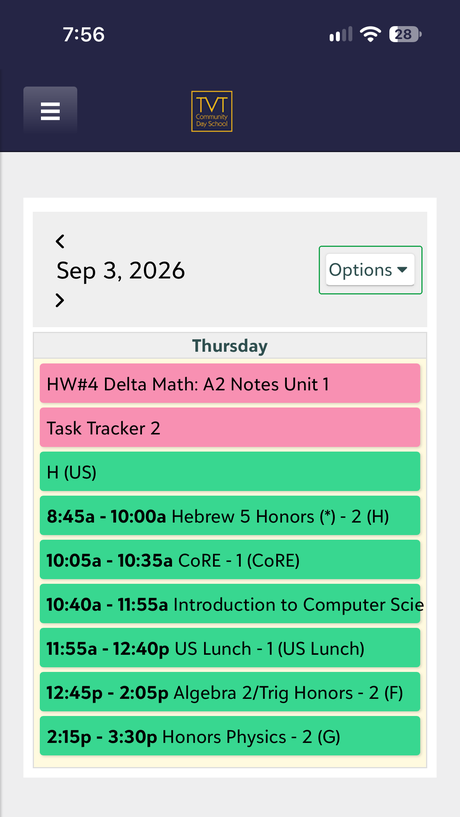
- Tap Options, at the top right of the calendar.
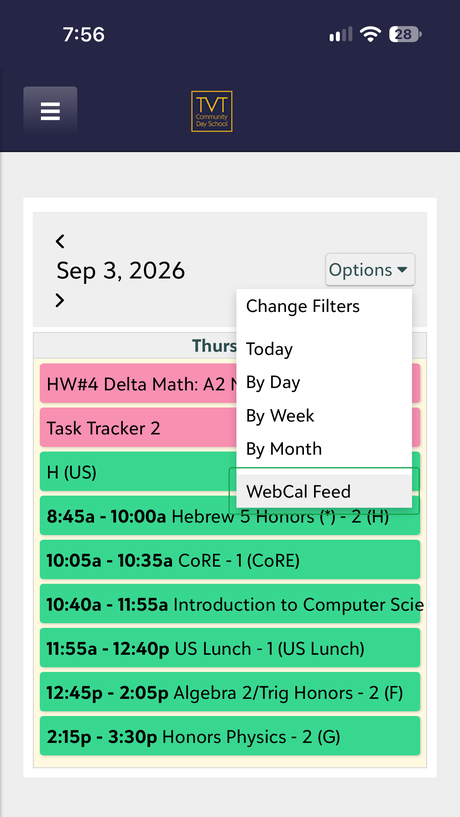
- Tap WebCal Feed — it’s the last thing on the list.
- Two links appear. Press and hold the one called School Calendars until a menu appears, then choose Copy Link. A normal tap opens your calendar app instead.
- Come back here and paste it into Daily Overview, in Settings → Calendar. It starts with
webcal://— paste it exactly as it is.
Fiddly on a phone? Every one of these steps is easier on a computer, and you only ever have to do it once.
Both links work, and you can add both. School Calendars is the one with homework and tests on it; My Calendars is your own events. Add School Calendars as your school calendar, and My Calendars as one of your own.
Your portal builds the feed in the background, so a brand-new link can look empty for up to an hour, and changes at school take about that long to show up. If nothing has arrived after an hour, the link is probably the wrong one — check you copied School Calendars.
That link is a password in disguise: anyone who has it can read your calendar. Don’t post it anywhere.
Schoology
PowerSchool Schoology learning platform
Calendar › iCal Feed
Upcoming & overdue items
Settings gear (top-right of calendar)1
iCal Feed2
3 ⟶
https://app.schoology.com/calendar/feed/ical/....icsCopy- Open Schoology on the web and click Calendar in the top menu.
- Click the gear icon in the top-right of the calendar ①.
- Choose iCal Feed ②.
- Copy the .ics link it shows ③ and paste it into Daily Overview.
Google Calendar / Classroom
If your school work lands in a Google Calendar
Settings › Settings for my calendars › (your calendar)
Calendar settings
Access permissions
Integrate calendar › Secret address in iCal format1
2 ⟶
https://calendar.google.com/calendar/ical/...%40group.../private-.../basic.icsCopy- On a computer, open Google Calendar → hover the calendar under “My calendars” → ⋮ → Settings and sharing.
- Scroll to Integrate calendar.
- Copy the Secret address in iCal format ①② — it ends in
.ics. - Paste it into Daily Overview.
Google Classroom automatically creates a Google Calendar for each class — open Classroom → a class → Calendar → Google Calendar, then grab the secret iCal link as above.
Use the Secret address, not the “Public” one — the secret link works even when the calendar isn’t shared publicly. Treat it like a password.
Apple Calendar / iCloud
A calendar you keep in iCloud
Sidebar › (your calendar) › Share
Public Calendar — turn ON1
2 ⟶
webcal://p XX-caldav.icloud.com/published/.../....icsCopy Link- Go to iCloud.com → Calendar and sign in.
- Hover the calendar in the sidebar and click the share icon (or right-click → Share Calendar).
- Turn on Public Calendar ①.
- Copy the webcal:// link it shows ② and paste it into Daily Overview as-is.
Anything else (Veracross, Aspen, Brightspace…)
The trick that works almost everywhere
Most school systems hide the same feature under slightly different names. Look around your calendar page for any of these words:
“Subscribe”1
“iCal Feed” / “Calendar Feed”2
“Export” / “Sync” / “ICS”3
⟶
… any link ending in .ics or starting with webcal://- Open your school’s calendar on the web.
- Look for Subscribe, iCal Feed, Calendar Feed, Export, or Sync.
- If it offers “Apple Calendar” or “Google Calendar,” right-click that button → Copy Link instead of clicking it.
- You want the link that ends in .ics or starts with webcal://. Paste it into Daily Overview.
Still stuck? A quick web search for “[your school system] iCal feed” usually turns up the exact menu — or ask a teacher; they often have the link handy.
Got your link?
Head back to Daily Overview and paste it in as your school calendar — you’ll see your classes, assignments, and tests organized automatically.
Open Daily Overview
Setting up a personal or family calendar instead? Home calendar setup →
Still need a hand? help@dailyoverview.net · Daily Overview
Still need a hand? help@dailyoverview.net · Daily Overview